
Watch catch-up TV
Catch-up replays programmes that have already aired, from your provider’s archive. In Kepler, open the TV guide, go back to a programme that has ended and press OK, or watch the programme on now from its start. It works on channels your provider keeps an archive for, with an Xtream Codes login.
 2:20 Watch the whole guide on YouTube About 2 minutes, in 5 chapters. Jump to the step you need. Open on YouTube
 On this page
Missed the start of a programme, or the whole of it? Catch-up plays it from your provider’s archive. This guide shows how to use IPTV catch-up in Kepler on a TV and a phone, how far back you can go, and what to do when a replay doesn’t play.
What catch-up is, and which channels have it
Some providers keep recent programmes of some channels on their server, for a few days. Kepler calls that catch-up. It plays a programme from that archive, from its start.
- Catch-up needs an Xtream Codes login. Kepler doesn’t read catch-up from an M3U link. If
your provider gave you a long link with
username=andpassword=in it, paste it in whole: Kepler turns it into an Xtream Codes login. - Only the channels your provider keeps an archive for have it. Kepler marks them:
- on a TV, a ↺ after the channel’s name in Live TV, and before the title of a programme that can be replayed in the TV guide;
- on a phone, CATCH-UP on the channel in Live, and a clock beside a programme that can be replayed in the Guide tab.
- The TV guide has a Catch-up group with all of them.
On a TV

In Guide, press BACK twice: Catch-up heads the groups, with the number of channels.
On a phone or tablet

In the Guide tab, tap the Catch-up chip.
Watch a programme that has ended
On a TV
-
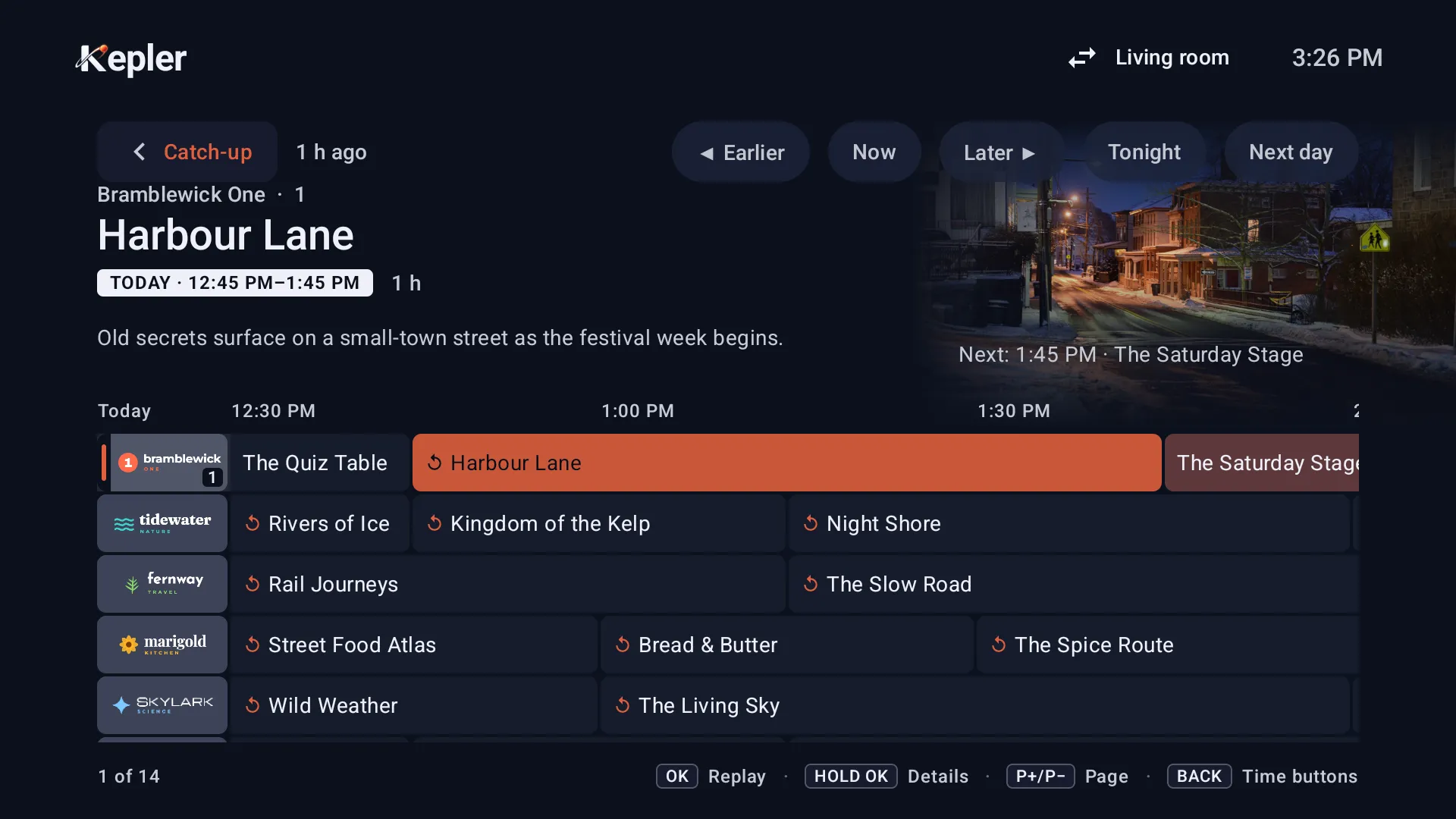
In Guide, press to go back to a programme that has ended. On a channel with catch-up, the legend says OK Replay.
-
Press OK. The programme plays from its start, like a film: press and to go back or forward 10 seconds, and to jump 5 minutes.

-
To go back to live, hold OK and choose Live, which reads Catch-up.

BACK returns to the guide, on the programme you replayed. P+ and P− go to the next channel, live.
On a phone or tablet
-
In the Guide tab, tap the channel, then Show … earlier. Programmes with a clock can be replayed.

-
Tap one. It plays from its start: tap back or forward 10 seconds, or double-tap the left or right edge.

To go back to live, tap back, or choose another channel.
A replay doesn’t go into Continue watching or your recent channels, can’t be recorded (it is already a recording) and doesn’t play in multiview. When it reaches its end, the player closes.
Watch what is on now from its start
On a TV

In Guide, hold OK on the programme on now and choose Play from the start. (OK alone plays the channel live.)
On a phone or tablet

While a channel plays, tap From … beside its name: it shows the time the programme started. In the player’s Guide, From the beginning does the same, and in Live, touch and hold a channel for Watch from the start.
Kepler can’t rewind live TV by itself. Going back is always catch-up, from your provider’s archive, and only as far as it keeps.
How far back you can go
Your provider decides how many days it keeps, channel by channel. In Kepler you can replay the programmes still in the TV guide, which keeps the last 6 hours. So even with a week of archive, Kepler reaches back about 6 hours.
Catch-up not working?

| What you see | What to do |
|---|---|
| No Catch-up group, no ↺ or CATCH-UP anywhere | Your playlist is an M3U link, or your provider keeps no archive. Add it as an Xtream Codes login, and ask your provider whether catch-up is on for your account. |
| This programme is not in the channel’s archive. The provider lists catch-up for this channel but is not serving it. | Your provider says the channel has catch-up but doesn’t have this programme. Try another programme or channel; if none plays, ask your provider. |
| The replay starts at the wrong time | Check the TV’s clock and time zone (see Wrong times in the guide). Replays that opened an hour late are fixed Coming in Kepler 1.7. |
| The server denied access to this video. and other messages | See IPTV not working. |
| The channel plays live instead of the replay | Kepler couldn’t build a catch-up address for it, for example for a programme older than your provider’s archive. |
At a faster speed, a replay can stall: most providers send it no faster than real time.
What is free and what needs Kepler Pro
Seeing which channels and programmes have catch-up is free. Replaying a programme and watching what is on now from its start need Kepler Pro. The 30-day trial on Google Play includes them. See Kepler Pro.
Checked with Kepler 1.7 (version 43) on . Screens show Kepler’s fictional demo catalogue.